Lesson 3
Objects and Events
Learn about objects and how to handle events in GameMaker.
Objects - The Warehouse
GameMaker uses an object / instance model for its games. Instances are “actors” or “entities” that exist in your game and perform the behaviours you give to them through code. Objects are the templates for instances.
In other words, objects are a blueprint for instances and whenever you want some actor/element/entity in your game, you “print” an instance from a particular object blueprint.
You define the behaviour once in the object, and can then repeatedly print multiple instances from that one object in your game. Each instance inherits the object’s behaviour.
Many beginners conflate objects and instances. An object is a blueprint that allows you to print instances. Objects never exist in-game, only instances. Each instance created from the object will inherit the events and code from that object blueprint, but the instance exists as its own independent thing once it is created.
Think of it like a house: many houses can be built from a single house blueprint and they will all be identical initially, but each house will have different things happen over its lifetime (a window smashed, a wall cracked, a new paint job) which has no effect on the other houses built from the blueprint.
You can create an object by right clicking on the Asset Browser (underneath the Quick Access panel), hovering the Create item and then selecting Object, or clicking the little + icon at the top and selecting Object (or the hotkey Alt+O if you’re impatient).
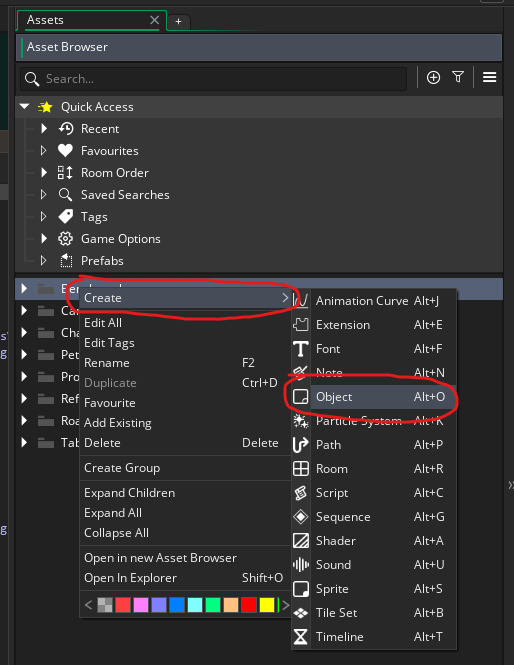
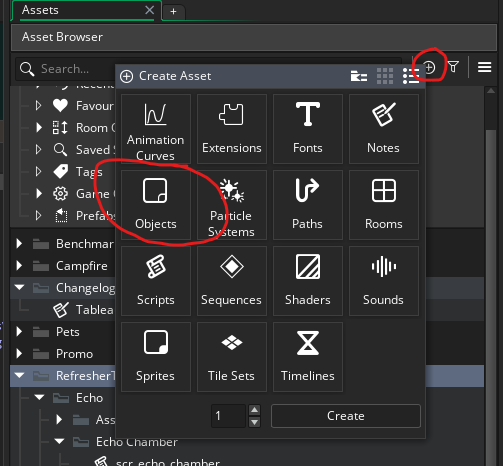
Once you have done so, you’ll be greeted with the Object window, with the Events window open. There are many different things you can do here, but for now, we’ll focus on Events.
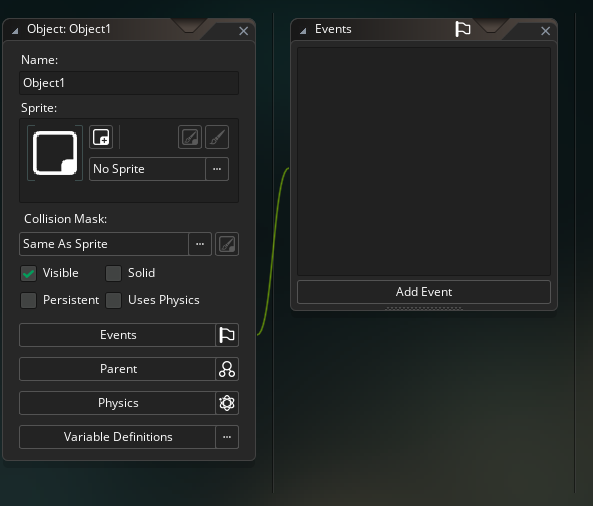
Events - Where behaviour lives
Events are how you organise your code. First, you decide what the purpose of the code you are going to write is, then you select the appropriate event, and write that code into that event.
Picking the correct Event for a chunk of code is very important. Adding code to the wrong Event is one of the main sources of bugs for beginners.
So when you are writing code, or even thinking about writing code, you should always be asking yourself questions about where that code needs to go.
- Does it need to happen every frame?
- Am I drawing something?
- Is this setup code?
- Am I reacting to something GameMaker is going to do internally (async, animation end, etc)?
These types of questions should help guide you towards the exact Event the code should go in.
The three main events that you will interact with are the Create Event, the Step Event and the Draw Event.
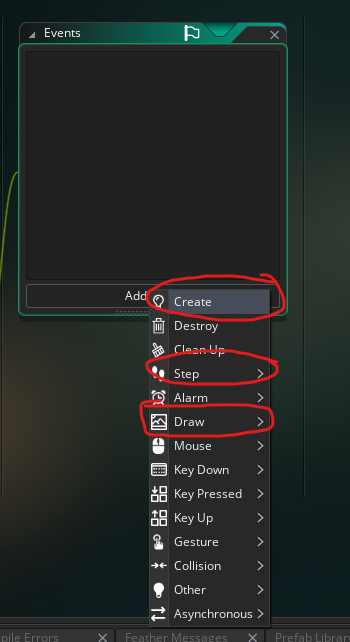
- Create Event
- The Create Event fires exactly once, when an instance is first created. You can use it to run setup code for the instance. You cannot put code here that needs to constantly run over the lifetime of the instance, so something like
left_key = keyboard_check(vk_left);does not belong in the Create Event, as you want that kind of code to constantly be checked. Instead that code would need to go in the Step Event.
- The Create Event fires exactly once, when an instance is first created. You can use it to run setup code for the instance. You cannot put code here that needs to constantly run over the lifetime of the instance, so something like
- Step Event
- The Step Event fires once per frame for the lifetime of the instance. This is the place where you want to put any dynamic code, like the
keyboard_check()I mentioned above, or anyifstatements that need answering across the lifetime of the instance.
- The Step Event fires once per frame for the lifetime of the instance. This is the place where you want to put any dynamic code, like the
- Draw Event
- The Draw Event is where you place any custom draw code you have. Don’t try to draw stuff in the Step Event or the Create Event. Almost all of your drawing code has to go here to work. If you do not add a Draw Event then GM will automatically draw the sprite assigned to the object.
There are many other events that GM gives you access to, but these three alone are more than enough to make a simple game with.
The simplest rule of thumb is:
- If you want something to happen once when a thing is created, often as initial setup, then put it in the Create Event.
- If you need something to repeatedly happen over time then put it in the Step Event.
- If you need to draw something put it in the Draw Event.
Event check
A quick check that you know where repeated behaviour belongs.
Task: Pick the right event
Which event should you use when code needs to check something every frame?